 Free Shipping (On select items & orders)
  Track My Order


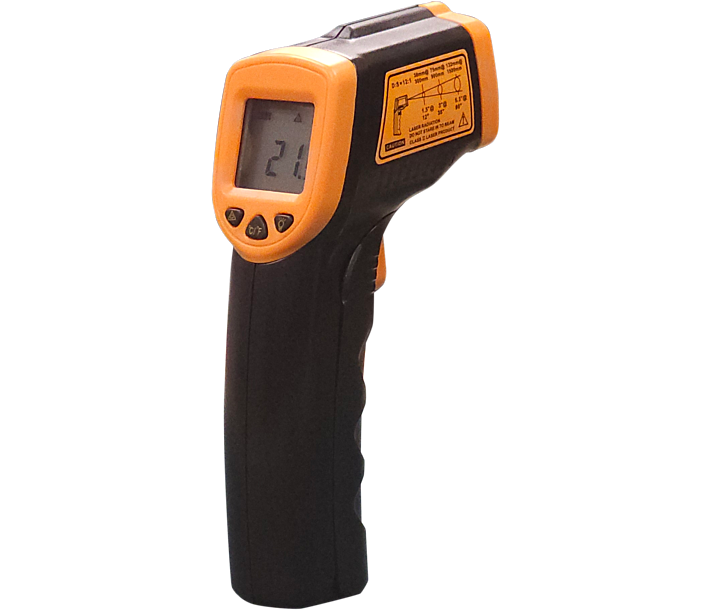
Omcan Infrared Thermometer 1" LCD with Back Light and Laser On/Off -26 ºF To 608 ºF / -32 ºC to 320 ºC NSF




Product Highlights
Omcan Infrared Thermometer 1" LCD with Back Light and Laser On/Off -26 ºF To 608 ºF / -32 ºC to 320 ºC NSF Canada
- ºC/ºF Dual Scale Laser Pointer
- 1" LCD display
- Auto power off
- High Accuracy
- Fast response time
- Ambient operating range: 0 to 40º (32 to 104ºF)

Product Overview
This Infrared Thermometer with a 1" LCD Backlight Display and Laser On/Off feature, designed for precision and versatility. This Omcan infrared thermometer measures temperatures ranging from -26°F to 608°F (-32°C to 320°C), making it perfect for a variety of applications, from culinary to industrial use. The NSF certification ensures it meets high standards for public health protection. The easy-to-read LCD display with a backlight allows for accurate readings even in low-light conditions, and the laser on/off function provides the flexibility to target specific areas with pinpoint accuracy.
 UPC: 690207472238
Specifications
Omcan Infrared Thermometer 1" LCD with Back Light and Laser On/Off -26 ºF To 608 ºF / -32 ºC to 320 ºC NSF Canada
| Price Label | Each |
|---|---|
| Manufacturing origin | China |
| Net Length | 5.5" |
| Net Width | 2.6" |
| Net Height | 1.5" |
| MFR # | 47223 |
| Brand | Omcan |
Frequently Asked Questions
What temperature range does the Omcan Infrared Thermometer 1" LCD with Back Light and Laser On/Off cover?
The range spans -26°F to 608°F (-32°C to 320°C), covering cold storage checks at the low end, oil and pan surface monitoring mid-range, and grill or flat-top verification near the upper limit. That span makes it practical for spot checks throughout a full commercial kitchen without switching instruments.
How does the laser on/off feature on the Omcan Infrared Thermometer 1" LCD benefit kitchen staff during service?
The laser lets you target a specific spot on a cooking surface, pan, or cold storage unit from a distance before taking the reading, improving accuracy on irregular or mixed surfaces. The on/off toggle lets you disable the laser in environments where pointing it near food or staff is a concern, without affecting measurement performance.
Is the Omcan Infrared Thermometer 1" LCD with Back Light and Laser On/Off NSF certified for Canadian foodservice?
Yes, this unit carries NSF certification, meeting the sanitation and design standards required in commercial foodservice environments across Canada. NSF certification is often a prerequisite for approval by local health authorities during kitchen inspections in most provinces and territories.
What should I avoid when using the Omcan Infrared Thermometer 1" LCD with Back Light and Laser to ensure accurate readings?
Accuracy depends on correct use: • Do not use to measure internal food temperatures; infrared reads surface temperature only, not core. • Do not measure through glass, steam, or visible smoke, as these distort infrared readings. • Do not expose to condensation or submerge in water; this unit is not waterproof. • Do not drop on hard surfaces; the sensor and LCD are impact-sensitive.
Why should a commercial kitchen use the Omcan Infrared Thermometer 1" LCD alongside a probe thermometer rather than instead of one?
Surface checks on flat-tops, induction burners, cold storage shelving, and display units are faster and cleaner with infrared because there is no contact required and no wait for probe stabilization. For confirming safe internal temperatures of meat, poultry, or egg dishes, a probe thermometer remains essential. The two tools work together in a complete temperature monitoring protocol.
How readable is the backlit display on the Omcan Infrared Thermometer 1" LCD with Back Light in low-light kitchen areas?
The backlit 1" LCD remains clearly readable in dimly lit walk-in coolers and prep areas. This removes the need to reposition under overhead lighting to confirm each reading, which speeds up multi-zone temperature checks. Browse the full range of commercial kitchen thermometers at Zanduco to build out a complete temperature monitoring toolkit.
How do I clean and maintain the Omcan Infrared Thermometer 1" LCD with Back Light and Laser to preserve sensor accuracy?
Wipe the unit body with a dry or slightly damp cloth. Never use solvents or immerse in liquid. Keep the sensor lens free from grease splatter, as film on the lens skews readings. Store with the battery removed if not in use for an extended period to prevent corrosion. Pair it with a contact probe thermometer from the kitchen supplies for complete surface and internal food safety coverage.
Customer Reviews
Be the first to review this product

